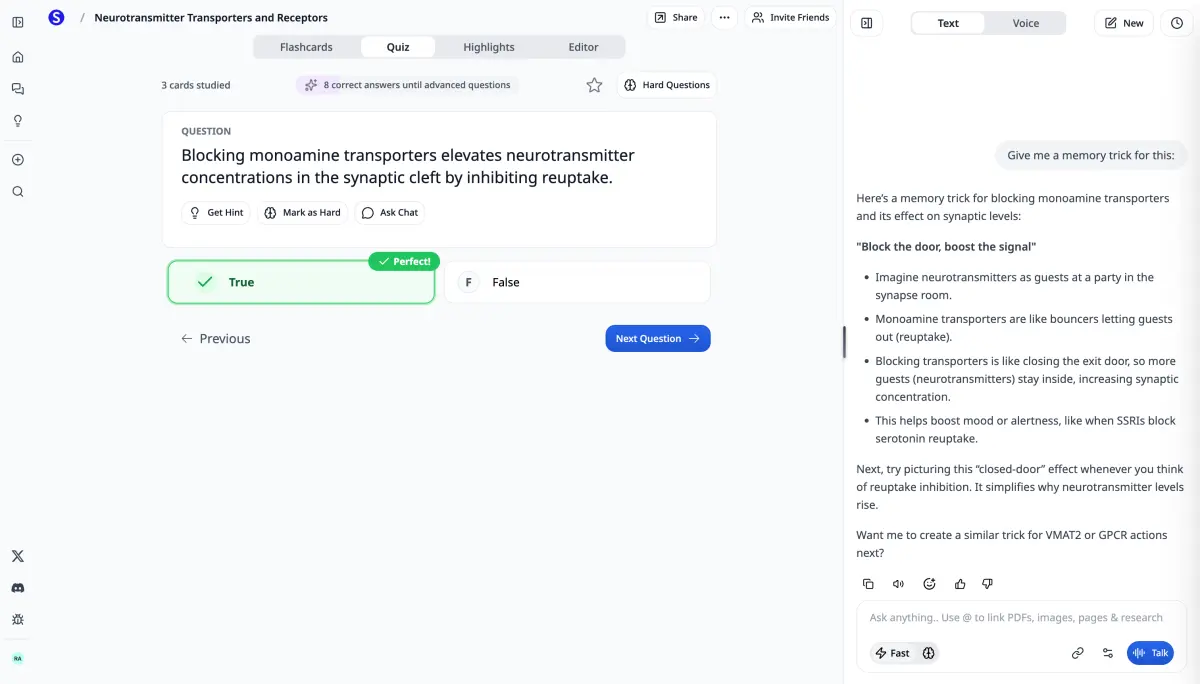
Study tools built for college students
Turn lecture slides, textbook chapters, and class notes into flashcards in seconds. Scholarly helps college students study more effectively with AI-powered tools built for exam prep.
Free to start · No credit card required
How College Students Use Scholarly
Exam Prep from Lecture Slides
Upload your professor's PowerPoint or PDF lecture slides and get flashcards covering key concepts, definitions, and formulas. Stop re-reading slides and start actively studying.
Textbook Chapter Flashcards
Upload textbook PDFs or paste chapter summaries and generate flashcards that cover the material you need to know. Great for courses with heavy reading loads.
Study Group Sharing
Create flashcard sets and share them with your study group. Split the work across different chapters or topics and everyone gets access to the complete set.
Midterm and Final Review
Combine notes from an entire semester into comprehensive flashcard sets. Use spaced repetition to review efficiently leading up to midterms and finals.
Features That Matter for College
Every Format Supported
Upload PDFs, PowerPoints, Word docs, images, paste text, or link YouTube AI Meeting Notes. Whatever format your material is in, Scholarly handles it.
Spaced Repetition
Stop cramming the night before. Built-in spaced repetition schedules reviews at optimal intervals so you retain material long-term.
Quiz and Test Mode
Test yourself with quiz mode to find gaps in your knowledge before the actual exam. Works for any subject.
Export Anywhere
Export to Anki, print as PDFs, or share with classmates. Your flashcards are never locked in.
How It Works
Step 1: Upload Your Material
Upload lecture slides, textbook PDFs, or paste your class notes.
Step 2: AI Creates Cards
Our AI identifies key concepts and creates flashcards with questions and answers.
Step 3: Study & Review
Study with spaced repetition, take quizzes, or export to Anki. Your cards, your workflow.
Frequently Asked Questions
Can I make flashcards from my professor's PowerPoint slides?
Yes. Upload PowerPoint (.pptx) files directly and Scholarly's AI will extract the content and create flashcards. This also works with PDF versions of slides.
Does it work for any subject?
Yes. Scholarly works for any college course: biology, chemistry, psychology, history, economics, computer science, and more. Upload your material and the AI adapts to the content.
Can I share flashcards with classmates?
Yes. Share any flashcard set with a link. Study groups can divide up card creation across chapters and everyone gets access to the full collection.
Is it free?
Yes, you can create flashcards for free with Scholarly. The free plan includes generous limits, and Premium raises your AI creation limits.
Keep exploring
Tools that pair well
Build a complete exam-prep stack with these tools.
PDF to Flashcards
Lecture PDFs to AI flashcards.
Flashcard Maker
Make flashcards from any source.
AI Study Guide Generator
Comprehensive study guides for any course.
AI Cheat Sheet Maker
One-page reference sheets for exam day.
Practice Test Generator
AI-generated practice exams.
Study Notes Generator
Organized notes from any source.
AI Lecture Notes
Create AI Meeting Notes and get clean notes.
Essay Outline Generator
Structure your next paper.
Citation Generator
APA, MLA, Chicago, Harvard.
AI Slide Generator
Slide decks for class presentations.
PowerPoint to Flashcards
Lecture slides to flashcards.
YouTube to Flashcards
Educational videos to flashcards.
Concept Map Generator
Visualize concept relationships.
Math Solver
Step-by-step math solutions.
Formula Sheet Generator
STEM formula reference sheets.
PDF Summarizer
Get the gist of any PDF.
Ready to Study Smarter?
Join college students who save hours on flashcard creation.
Free
See what it does with one of your own sources.
- 3 AI Chat messages per day
- 1 free AI creation total
- 1 free file upload total (8MB)
- 5 quiz questions per day
- 1 exam attempt per day
- 15 voice minutes per day
- 32-page PDF to flashcards
- 500 autocomplete words per day
Use it to generate flashcards, improve a deck, or create a podcast, video lecture, slides, infographic, mind map, study guide, worksheet, spreadsheet, story book, timeline, SOP, flowchart, lesson plan, or outline — or run Deep Research or turn a recording into AI Meeting Notes.
Premium
Steady weekly output from the material you already have.
$30/month
Everything in Free, plus:
- 10 AI creations per week
- Unlimited AI chat & autocomplete
- Unlimited file uploads (up to 300MB)
- Unlimited study sessions
- Unlimited exams & quizzes
- 1000-page PDF to flashcards
- Export to Anki
- Priority support
Laureate
For work where being right matters more than the price.
billed monthly · cancel anytime
Everything in Premium, plus:
- Any Frontier model — Claude Opus 5, Gemini 3.1 Pro, Grok 4.6
- 75 AI creations per week
- 20 Frontier creations per week
- 20 Frontier Chat messages per week
- Unlimited uploads up to 1 GB, plus 3,000-page PDFs
- 12 hours of voice mode per day
- Priority support and early access to new Frontier models
Pricing shown in USD. Local currency may be available for Premium in app.
Compare plans
AI chat
Premium and Laureate include unlimited AI chat. Frontier Boost on makes Auto (Laureate) use Claude Opus 5; off uses GPT 5.6 Luna.
- Free
- 3/day
- Premium
- Unlimited
- Laureate
- Unlimited
Chat Frontier Boosts
Premium includes recommended access to Grok 4.6, Gemini 3.1 Pro, and Claude Sonnet 5. Laureate adds the remaining Frontier catalog plus 20 Frontier creations and 20 Frontier Chat responses each week; Auto uses Claude Opus 5 while boosts remain and GPT 5.6 Luna afterward.
- Free
- —
- Premium
- —
- Laureate
- 20/week
AI creations
AI creations are used for AI Flashcards, deck edits, AI Podcasts, AI Video Lectures, AI Slides, worksheets, AI Infographics, mind maps, study guides, spreadsheets, story books, timelines, SOPs, flowcharts, lesson plans, outlines, AI Meeting Notes, and Deep Research reports.
- Free
- 1 total
- Premium
- 10/week
- Laureate
- 75/week
Creation Frontier Boosts
Frontier Boost on makes Auto (Laureate) use Claude Opus 5; off uses GPT 5.6 Luna. Laureate includes 20 boosts within its 75 weekly creations. Flashcards never spend a boost.
- Free
- —
- Premium
- —
- Laureate
- 20/week · included
Video lectures
- Free
- Uses AI creations
- Premium
- Included in 10/week
- Laureate
- Included in 75/week
File uploads
- Free
- 1 total (8MB)
- Premium
- Unlimited (300MB)
- Laureate
- Unlimited (1 GB each)
PDF to flashcards
- Free
- 32 pages
- Premium
- 1000 pages
- Laureate
- 3000 pages
Practice questions
- Free
- 5/day
- Premium
- Unlimited
- Laureate
- Unlimited
Practice exams
- Free
- 1/day
- Premium
- Unlimited
- Laureate
- Unlimited
Voice mode
- Free
- 15 min/day
- Premium
- 2 hr/day
- Laureate
- 12 hr/day
Autocomplete
- Free
- 500 words/day
- Premium
- Unlimited
- Laureate
- Unlimited
Export to Anki
- Free
- —
- Premium
- Included
- Laureate
- Included
Support
- Free
- Standard
- Premium
- Priority
- Laureate
- Priority
What customers say
Scholarly has enhanced the quality of notes and questions I administer to my tutees. Insightful, to the point.
TD Georgas
Tutor
I have very good experience with Scholarly it summarize me scientific text in hovel academic level with citation. I use this for any therapeutic area . It is great and useful tool.
Diana
Scholarly user
Scholarly has been a valuable tool for my studies. The AI-generated flashcards and intuitive features make organizing and retaining information much easier.
Briana
Scholarly user
This app is great for studying for big test. Drop your PDF's in the system and it'll do the trick. You can organize it specifically for your needs.
Kelvin
Scholarly user
Your questions, answered
Is Scholarly free to use?
Yes! The free plan includes core study tools with clear limits: 3 AI Chat messages per day, one free AI creation total, 1 free file upload total, quizzes, practice exams, and manual flashcard creation. Upgrade to Premium for 10 AI creations per week and unlimited uploads.
What uses my free AI creations?
Generating flashcards, improving a flashcard deck, making a podcast, creating a video lecture or infographic, building slides, a spreadsheet, or a story book, making a mind map, study guide, or worksheet, having an AI Agent create a timeline, SOP, flowchart, lesson plan, or outline, running Deep Research, or processing a recording uses your free AI creation. It is a lifetime free credit and does not reset. AI Chat messages, quizzes, and exams still have separate daily limits; free file uploads are also lifetime credits.
Can I cancel anytime?
Absolutely. There are no contracts or commitments. You can cancel your subscription at any time from your account settings, and you'll keep access until the end of your billing period.
What payment methods do you accept?
We accept all major credit and debit cards through Stripe. Pricing is displayed in USD by default, but local currency is available in the app.
Can I use Scholarly with a class or school?
Yes. For a school or organization-wide rollout, contact us at hello@scholarly.so and we'll help you find the right setup.
What happens when I hit a free plan limit?
You'll see a prompt to upgrade. Your existing work is never lost — limits only apply to new actions. Free AI creations and the free upload are lifetime credits and do not reset. Premium includes 10 AI creations per week and unlimited uploads.