Study smarter, not harder, with AI

Learn how to study with AI the right way: turn your PDFs, notes, and lectures into flashcards, quizzes, and grounded explanations in seconds — with AI built on your own material, not generic answers.

Explore AI features

170,000+ students already studying smarter • Free to start

Used by 170,000+ students worldwide

170,000+
Students learning
70+
Languages supported
10+
AI study tools
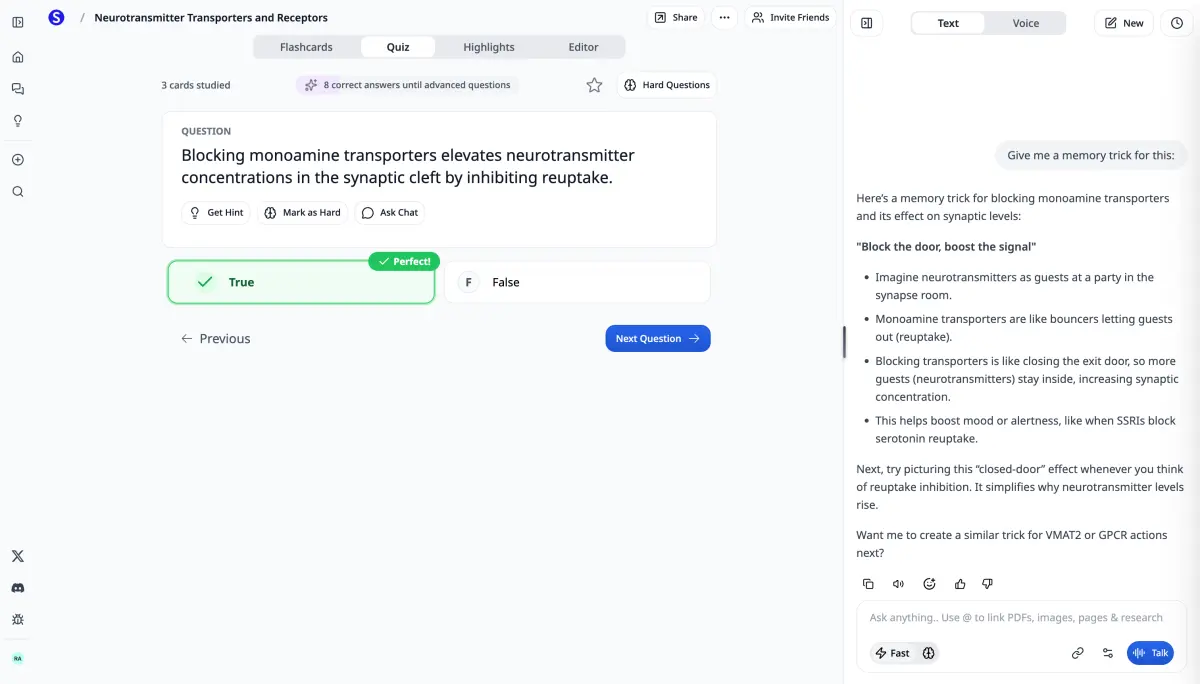
Scholarly workspace showing uploaded course materials alongside AI-generated flashcards, quizzes, and study guides

The basics

What is Study AI?

Study AI is the practice of using artificial intelligence tools to enhance your learning, improve retention, and save time studying.

Faster Learning

AI generates flashcards, summaries, and practice tests in seconds - saving you hours of manual work.

Better Retention

AI-powered spaced repetition and adaptive quizzes help you remember information longer.

Personalized Help

AI Chat provide instant, customized explanations tailored to your learning style and level.

Step by step

How to Study with AI: Complete Guide

Follow these steps to transform your studying with artificial intelligence.

  1. 1

    Upload Your Study Materials

    Start by uploading PDFs, lecture notes, textbook chapters, or any study material to Scholarly. AI works best when it has your actual course content.

  2. 2

    Let AI Generate Study Resources

    Use AI to instantly create flashcards, practice quizzes, study guides, and summaries from your materials. What used to take hours now takes 30 seconds.

  3. 3

    Study with Adaptive Learning

    Practice with AI quizzes that adapt to your knowledge level. Focus on weak areas while skipping what you already know.

  4. 4

    Get Help from AI Chat

    Stuck on a concept? Press ⌘J anywhere to use AI Chat. Get instant explanations, examples, and practice problems.

  5. 5

    Track Your Progress

    AI tracks what you know and what you struggle with. See your mastery level for each topic and focus your study time where it matters most.

Why it works

Why Students Choose AI for Studying

Save Time on Study Setup

Use AI to create flashcards, notes, summaries, and practice tests faster from the material you already have.

Build Better Practice

Turn passive reading into active recall with adaptive quizzes, practice questions, and targeted review.

Study Anywhere, Anytime

Use AI Chat from any device. Get help at 2am before an exam or on your commute to class.

Free to Start

Unlike expensive tutors or premium-only apps, Scholarly has a free plan for core study tools and paid plans for higher limits.

In practice

How Students Use Study AI

Exam Preparation

Generate practice tests from lecture notes, create flashcards from textbook chapters, and quiz yourself until you've mastered every concept.

Research Papers

Summarize research papers in seconds, extract key findings, and organize sources with AI. Write better papers in less time.

Daily Homework

Get instant help with homework problems, check your work before submitting, and understand concepts you're struggling with.

Powered by AI agents

Every tool here is a purpose-built AI agent

Scholarly doesn't just call a model once. Each feature is run by an autonomous AI agent that reads your material, reasons across multiple models, and can research the web and run code — then hands back a finished, cited artifact.

Multiple models

Agents route each step to the model that does it best, instead of relying on a single one.

Live web research

When your sources aren't enough, agents search the web and cite what they find.

Runs code in a sandbox

Each agent gets its own sandbox to compute, transform data, and build your artifact.

Grounded in your sources

Every output is built from the PDFs, notes, and lectures you upload — not guesswork.

By study task

Every AI study tool, grouped by what you're doing

Pick the AI study tool that fits the task in front of you — each one works from your own PDFs, notes, and lectures.

FAQ

Frequently Asked Questions

Is it cheating to use AI for studying?

No! Using AI for studying is like using a calculator for math - it's a tool to help you learn more efficiently. AI helps you create study materials, practice problems, and get explanations. You still do the learning and take the tests yourself.

How does AI help me study better?

AI analyzes your study materials and creates personalized flashcards, quizzes, and summaries. It adapts to your learning pace, focuses on your weak areas, and provides instant feedback - common study methods for improving retention and understanding.

Do I need technical skills to use study AI?

Not at all! Scholarly is designed to be simple - just upload your notes or PDFs and click generate. The AI does all the technical work. If you can use Google Docs, you can use Study AI.

How much does it cost to study with AI?

Scholarly has a free plan for core study tools. Premium unlocks higher limits and advanced features for students who need more.

What subjects can I study with AI?

All of them! AI works for STEM (math, physics, chemistry, biology), humanities (history, literature, philosophy), languages, business, and more. If you can study it, AI can help you learn it better.

How do I use AI to study for an exam?

Upload your lecture slides, notes, and past papers, then have the AI build a study guide and flashcards from them. Generate a practice test to find your weak spots, review those topics with AI Chat, and re-quiz yourself with spaced repetition until your mastery for each topic is high. Because everything is grounded in your own material, you study what's actually on your exam — not generic content.

Can I study with AI using my own lecture notes and PDFs?

Yes — that's the whole point. Scholarly is source-grounded, so you upload your real PDFs, lecture slides, handwritten-note photos, or YouTube lectures and the AI generates flashcards, notes, summaries, podcasts, and quizzes from that exact material. Answers cite your source, so you can trust they reflect your course rather than the open internet.

Get started

Ready to Study Smarter with AI?

Join 170,000+ students using AI to study with flashcards, quizzes, notes, and AI Chat in one place.

Explore AI features

No credit card required • Access all AI study tools instantly

Start Studying with AI Today

Join 170,000+ students learning smarter with artificial intelligence. Start free.

Free

See what it does with one of your own sources.

$0/month

  • 3 AI Chat messages per day
  • 1 free AI creation total
  • 1 free file upload total (8MB)
  • 5 quiz questions per day
  • 1 exam attempt per day
  • 15 voice minutes per day
  • 32-page PDF to flashcards
  • 500 autocomplete words per day

Use it to generate flashcards, improve a deck, or create a podcast, video lecture, slides, infographic, mind map, study guide, worksheet, spreadsheet, story book, timeline, SOP, flowchart, lesson plan, or outline — or run Deep Research or turn a recording into AI Meeting Notes.

Most Popular

Premium

Steady weekly output from the material you already have.

$12/month

$30/month

Everything in Free, plus:

  • 10 AI creations per week
  • Unlimited AI chat & autocomplete
  • Unlimited file uploads (up to 300MB)
  • Unlimited study sessions
  • Unlimited exams & quizzes
  • 1000-page PDF to flashcards
  • Export to Anki
  • Priority support

Laureate

For work where being right matters more than the price.

$99/month

billed monthly · cancel anytime

Everything in Premium, plus:

  • Any Frontier model — Claude Opus 5, Gemini 3.1 Pro, Grok 4.6
  • 75 AI creations per week
  • 20 Frontier creations per week
  • 20 Frontier Chat messages per week
  • Unlimited uploads up to 1 GB, plus 3,000-page PDFs
  • 12 hours of voice mode per day
  • Priority support and early access to new Frontier models

Pricing shown in USD. Local currency may be available for Premium in app.

Compare plans

AI chat

Premium and Laureate include unlimited AI chat. Frontier Boost on makes Auto (Laureate) use Claude Opus 5; off uses GPT 5.6 Luna.

Free
3/day
Premium
Unlimited
Laureate
Unlimited

Chat Frontier Boosts

Premium includes recommended access to Grok 4.6, Gemini 3.1 Pro, and Claude Sonnet 5. Laureate adds the remaining Frontier catalog plus 20 Frontier creations and 20 Frontier Chat responses each week; Auto uses Claude Opus 5 while boosts remain and GPT 5.6 Luna afterward.

Free
Premium
Laureate
20/week

AI creations

AI creations are used for AI Flashcards, deck edits, AI Podcasts, AI Video Lectures, AI Slides, worksheets, AI Infographics, mind maps, study guides, spreadsheets, story books, timelines, SOPs, flowcharts, lesson plans, outlines, AI Meeting Notes, and Deep Research reports.

Free
1 total
Premium
10/week
Laureate
75/week

Creation Frontier Boosts

Frontier Boost on makes Auto (Laureate) use Claude Opus 5; off uses GPT 5.6 Luna. Laureate includes 20 boosts within its 75 weekly creations. Flashcards never spend a boost.

Free
Premium
Laureate
20/week · included

Video lectures

Free
Uses AI creations
Premium
Included in 10/week
Laureate
Included in 75/week

File uploads

Free
1 total (8MB)
Premium
Unlimited (300MB)
Laureate
Unlimited (1 GB each)

PDF to flashcards

Free
32 pages
Premium
1000 pages
Laureate
3000 pages

Practice questions

Free
5/day
Premium
Unlimited
Laureate
Unlimited

Practice exams

Free
1/day
Premium
Unlimited
Laureate
Unlimited

Voice mode

Free
15 min/day
Premium
2 hr/day
Laureate
12 hr/day

Autocomplete

Free
500 words/day
Premium
Unlimited
Laureate
Unlimited

Export to Anki

Free
Premium
Included
Laureate
Included

Support

Free
Standard
Premium
Priority
Laureate
Priority

What customers say

Scholarly has enhanced the quality of notes and questions I administer to my tutees. Insightful, to the point.

TD Georgas

TD Georgas

Tutor

I have very good experience with Scholarly it summarize me scientific text in hovel academic level with citation. I use this for any therapeutic area . It is great and useful tool.

Diana

Diana

Scholarly user

Scholarly has been a valuable tool for my studies. The AI-generated flashcards and intuitive features make organizing and retaining information much easier.

Briana

Briana

Scholarly user

This app is great for studying for big test. Drop your PDF's in the system and it'll do the trick. You can organize it specifically for your needs.

Kelvin

Kelvin

Scholarly user

Your questions, answered

Is Scholarly free to use?

Yes! The free plan includes core study tools with clear limits: 3 AI Chat messages per day, one free AI creation total, 1 free file upload total, quizzes, practice exams, and manual flashcard creation. Upgrade to Premium for 10 AI creations per week and unlimited uploads.

What uses my free AI creations?

Generating flashcards, improving a flashcard deck, making a podcast, creating a video lecture or infographic, building slides, a spreadsheet, or a story book, making a mind map, study guide, or worksheet, having an AI Agent create a timeline, SOP, flowchart, lesson plan, or outline, running Deep Research, or processing a recording uses your free AI creation. It is a lifetime free credit and does not reset. AI Chat messages, quizzes, and exams still have separate daily limits; free file uploads are also lifetime credits.

Can I cancel anytime?

Absolutely. There are no contracts or commitments. You can cancel your subscription at any time from your account settings, and you'll keep access until the end of your billing period.

What payment methods do you accept?

We accept all major credit and debit cards through Stripe. Pricing is displayed in USD by default, but local currency is available in the app.

Can I use Scholarly with a class or school?

Yes. For a school or organization-wide rollout, contact us at hello@scholarly.so and we'll help you find the right setup.

What happens when I hit a free plan limit?

You'll see a prompt to upgrade. Your existing work is never lost — limits only apply to new actions. Free AI creations and the free upload are lifetime credits and do not reset. Premium includes 10 AI creations per week and unlimited uploads.